

Korea mobile setup guide

How to Use eSIM in Korea

Compare data eSIMs, Korean number eSIMs, physical SIM cards, and roaming before you arrive in Korea.

Travelers using phone calls, mobile search and maps while connected in Seoul

Fast decision

Quick answer

For most short trips to Korea, an unlocked phone that supports eSIM and a data plan are usually enough. Maps, messaging, translation and everyday web searches all work without a Korean phone number, and setting the connection up before arrival can save time at the airport.

A Korean number becomes useful when you expect local calls, SMS or services that genuinely need a domestic contact number. It is worth separating that from identity verification: having a Korean number does not automatically give a short-term visitor access to every Korean verification system.

Choose by need

Decide what you actually need

Start with the service you need during the trip, then compare setup, support, and limitations.

DATA ONLY

International travel eSIM

A data eSIM is usually the simplest answer when the phone mainly needs maps, messaging, translation, browsing and app access during the trip. It can often be bought and installed before departure, so there is no physical SIM to collect after landing.

The trade-off is that many international travel eSIMs do not include a Korean phone number, calls or SMS. If those services are not part of the trip, that may not matter at all. If they are, the next option is more relevant.
KOREAN NUMBER

Korean-number eSIM

A Korean-number eSIM makes more sense when local calls, SMS or a domestic contact number are genuinely useful during the trip. That can matter for some drivers, reservations, hotels or other services where someone in Korea needs to reach you directly.

These plans can involve more setup than a data-only travel eSIM, including passport or activation requirements. A Korean number can make local communication easier, but it still does not guarantee access to every Korean identity-verification service.

Physical SIM

A physical SIM still makes sense when the phone does not support eSIM or when you would rather have someone help with the setup in person. Airport and store pickup can feel slower than an online eSIM, but staff support may be worth that extra step when you want to see the connection working before you leave.

It can also be useful for travelers looking at Korean-number plans. The practical downside is that pickup or delivery is required, and phones with only one physical SIM slot may need the home SIM removed.

International roaming

Roaming is the least complicated option when keeping your usual number and avoiding another SIM setup matters more than price. The phone continues using the home carrier, which can be convenient for a very short trip or for someone who simply does not want to manage another line.

The trade-off is cost and plan limits. International roaming can be significantly more expensive depending on the home carrier, so check the actual daily or trip charge before treating convenience as the cheaper option.

Compatibility first

Check whether your phone will work

A compatible unlocked phone is the main requirement for using an eSIM in Korea. Complete these checks before comparing plans.

  1. Step 1
    Confirm eSIM support

    Check that your phone model can install an eSIM. On iPhone, the basic path is Settings → Cellular or Mobile Data → Add eSIM. On Android, it is usually Settings → Connections or Network → SIM manager → Add eSIM. Menu names vary by device and OS version.

  2. Step 2
    Confirm carrier-unlocked status

    Make sure your home carrier allows another mobile plan on the phone.

  3. Step 3
    Check the plan conditions

    Confirm that the included services and activation timing fit your arrival and travel needs.

  4. Step 4
    Save the installation details

    Keep the QR code, manual activation details, and provider instructions available before departure.

Using two lines

Can you keep your home number while using a Korea eSIM?

Often, yes. On phones that support two active lines, the travel eSIM can handle mobile data while your usual SIM remains available for the number you already use at home. This can be useful when a bank, airline or other service still sends a security code to that number during the trip.

The important part is separating “keeping the line available” from “using that line for mobile data.” Your home carrier may charge international roaming fees depending on its rules and the way the line is used abroad. Before departure, understand what your carrier charges for calls, texts and data rather than turning every setting on and hoping for the best.

For many travelers, the simplest setup is to use the Korea eSIM for data and keep the home line only for the services that genuinely require the original number. The exact dual-SIM options depend on the phone model and carrier.

Compare before buying

Compare your Korea mobile options

Korea mobile options compared by traveler type, benefits, and limits.
Option Makes sense when What becomes easier Trade-off
Data-only eSIM The trip mainly needs maps, messaging, translation, browsing and app access Online purchase and setup before departure, with no airport pickup Often excludes a Korean number, calls and SMS
Korean number eSIM Local calls, SMS or a domestic contact number are genuinely useful Hotels, drivers and some local services can reach you directly May require passport verification or extra activation, and does not guarantee every identity check
Physical SIM The phone lacks eSIM support or in-person setup help matters Staff can help with installation and Korean-number plans may be easier to arrange Requires pickup or delivery, and a one-slot phone may need the home SIM removed
International roaming Keeping the home number with the least setup matters more than price No new SIM installation, and the usual number stays active Costs and limits depend on the home carrier and can be much higher
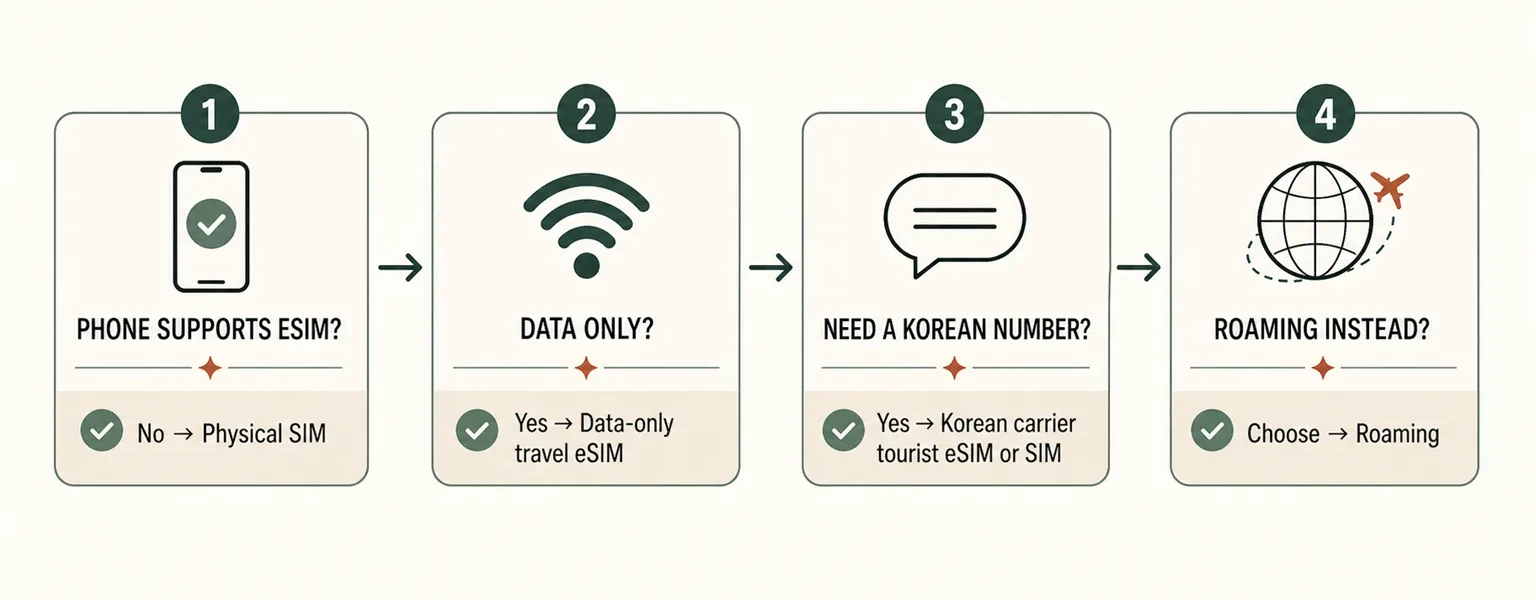
Korea eSIM quick decision guide comparing phone eSIM support, data-only use, Korean phone number needs, physical SIM, and roaming.
Use this quick decision path as a starting point, then confirm the plan's included services and activation rules before buying.

Planning your data

How much data will you actually use?

The useful question is not whether a plan sounds large or small. Think about what your phone will be doing during an ordinary day in Korea.

Maps, messaging and translation

Navigation, messages, web searches and translation are usually much lighter than constant video use. If these are the main reasons you need mobile data, a huge plan may matter less than reliable activation and enough validity for the whole trip.

Social media, video calls and frequent uploads

Short videos, photo uploads and video calls can use data much faster. Travelers who post throughout the day should pay more attention to the amount of high-speed data included rather than looking only at the word “unlimited.”

Hotspot, streaming or laptop use

Tethering a laptop, streaming video or sharing one connection with another traveler can change data use dramatically. Check whether hotspot use is allowed and whether the plan reduces speed after a certain amount of high-speed data has been used.

“Unlimited” does not always mean unlimited full-speed data. Before buying, compare the high-speed allowance, any reduced-speed policy, hotspot rules and the plan's validity period.

Traveling together

Does everyone in your group need an eSIM?

Not always. If two people stay together all day and the selected plan allows hotspot use, one phone can sometimes share its connection with the other. That can be enough for a short trip when both travelers rarely separate.

The inconvenience appears when one person walks away with the connected phone. The other traveler can suddenly lose maps, translation, ride information and messaging at exactly the moment they need them. Hotspot use also increases battery drain and depends on the plan allowing tethering.

If people expect to split up, travel separately, use taxis independently or simply want their own navigation at all times, individual data connections are usually much more comfortable. This is a convenience decision, not a rule that every traveler must automatically buy a separate plan.

International eSIM

If a data eSIM sounds right for your trip, the next decision is the plan rather than the technology. Compare how much high-speed data you get, how long it remains valid, whether hotspot use is allowed, when activation begins and what happens if installation fails.

Korea Inside compares the main travel eSIM options separately so this guide can stay focused on setup and real-world use. Use the comparison guide when you are ready to look at Ubigi, Saily and Airalo side by side.

Local mobile service

Do you actually need a Korean phone number?

For many short trips, you may not need one at all. Maps, translation, messaging, web searches and many ordinary travel tasks work with mobile data, which is why a data-only eSIM is enough for a large share of visitors.

A Korean number becomes more useful when someone in Korea needs to contact you directly — for example a hotel, driver or local service — or when a reservation or service genuinely expects a domestic contact number or SMS. That is a different need from simply having internet access.

There is one important limit: having a Korean phone number does not automatically give a short-term visitor the same identity-verification access as a Korean resident. A local number can make communication easier without unlocking every Korean verification system.

Korean eSIM and SIM plans

Use this option when local mobile services matter more than the fastest online setup. If you need a Korean number, domestic calls, or SMS, compare Korean carrier eSIMs with a phone number to see how SK Telecom, KT, and LG U+ differ in activation, calling, messaging, and identity-verification limits.

  • Check passport verification and activation timing.
  • Confirm calls, SMS, and Korean-number availability.
  • Compare airport pickup, store pickup, and online setup.

Some Korean telecom or tourist SIM/eSIM products may require passport verification, especially when the plan includes a Korean number, voice calls, or SMS. Before purchase, confirm the activation method, pickup method, passport requirement, and included services.

Setup sequence

Install and activate your eSIM

Use the provider's installation method and activation timing. Keep the setup information available until the connection is working.

Installing the eSIM and starting the plan are not always the same thing

Adding an eSIM to your phone and starting its paid validity are not always the same event. Many travel eSIMs can be installed before departure, which is useful because you still have reliable Wi-Fi, the QR code and the provider instructions in front of you.

The important detail is when that particular plan starts counting its validity. Some plans begin when they first connect to a supported network, while others use a different activation rule. Read the provider's activation instructions before installing rather than assuming that “installed” and “started” mean the same thing.

The practical goal is to arrive in Korea with the profile ready on the phone without accidentally starting a short-validity plan earlier than intended.

  1. Step 1
    Keep the installation details ready

    Save the QR code, manual activation details, and provider instructions. Some eSIMs cannot be reinstalled with the same QR code after deletion.

  2. Step 2
    Follow the provider's setup method

    Install through the QR code, app, counter, or staff setup method provided with the plan. Complete passport verification if the selected product requires it.

  3. Step 3
    Activate at the correct time

    Follow the provider's instructions about when activation begins. After activation, select the eSIM as the mobile data line and turn on data roaming if the plan requires it.

After landing

The first five minutes after landing

Do this while airport Wi-Fi is still available. It is much easier to fix a setup problem before leaving the terminal than after arriving at a subway platform with no working data.

  1. Step 1
    Make sure the eSIM line is turned on.

    The profile may already be installed without being active as a usable line.

  2. Step 2
    Set the Korea eSIM as the mobile data line.

    Installing an eSIM does not automatically guarantee that the phone is using it for data.

  3. Step 3
    Turn on data roaming for the travel eSIM if the provider requires it.

    This setting is common with international travel eSIMs, but follow the selected provider's instructions.

  4. Step 4
    Make sure the plan's activation period has actually started.

    A correctly installed profile may still have no service if the plan is not yet active.

  5. Step 5
    Open a real webpage or map.

    Do not rely only on seeing LTE or 5G in the status bar.

  6. Step 6
    Keep the airport Wi-Fi until the connection is proven.

    If something is wrong, you still have internet access to read the setup instructions or contact support.

If you need messages from home, confirm that your primary SIM remains available. If you expect calls or SMS from the travel plan, confirm that they are included.

Connection troubleshooting

The eSIM is installed, but there is still no data

Do not start by deleting the eSIM. A missing data connection is often a settings or activation problem, and some eSIM profiles cannot simply be reinstalled with the same QR code.

  1. Step 1
    Check that the eSIM line is turned on.
  2. Step 2
    Check that mobile data is using the eSIM rather than the home line.
  3. Step 3
    Check data roaming if the provider requires it.
  4. Step 4
    Check whether the plan has reached its activation time or network.
  5. Step 5
    Turn Airplane Mode on briefly, then reconnect.
  6. Step 6
    Restart the phone if the connection still does not appear.
  7. Step 7
    Use any APN or manual network instructions only when the provider specifically supplies them.
  8. Step 8
    Contact the provider before deleting the eSIM profile.

Deleting the profile should be a last step, not the first troubleshooting step. If the provider confirms that the eSIM can be reissued or reinstalled, then follow its instructions.

Avoid common failures

Mistakes that cause the most trouble

Scanning an expired or used QR code

The QR code may already have been used, may have expired or may simply be failing to scan properly. Before removing an existing profile, look for the manual activation details or contact the provider so you do not turn a small setup problem into an eSIM that can no longer be installed.

Leaving the wrong data line selected

An eSIM can be installed perfectly while the phone continues trying to use another line for mobile data. Check which line is actually selected, whether the travel eSIM is turned on and whether the provider requires data roaming before assuming the eSIM itself has failed.

Expecting calls or SMS from a data-only plan

A data-only eSIM can provide excellent internet access without including a Korean number, voice calls or SMS. If any of those services matter during the trip, check them before purchase rather than discovering the limitation after arrival.

Buying while the phone is carrier-locked

A phone that supports eSIM can still reject another mobile plan when it is locked to the home carrier. This is something to confirm before buying because changing providers after landing will not fix a carrier lock.

Deleting the eSIM because it will not connect

A connection problem is usually a bad reason to delete the profile first. Check the active line, roaming, activation timing and provider instructions before removing anything, because some eSIMs cannot simply be installed again with the same QR code.

Important: Having a Korean phone number does not always mean you can complete identity verification on Korean apps.

After Korea

When the trip is over

Once you are home and your regular mobile service is working again, switch mobile data back to your usual line and restore the settings you normally use with your home carrier.

Do not rush to delete the travel eSIM while you are still in transit or while there is any chance you may need its remaining validity, account information or support history. Once the trip is clearly finished, follow the provider's instructions for removing a plan you no longer need.

Bottom line

The simplest way to think about it

For most short-term visitors with an unlocked eSIM-compatible phone, this does not need to be complicated. A data eSIM is usually enough for maps, messaging, translation and ordinary browsing, while a Korean-number plan is worth the extra setup only when local calls, SMS or a domestic contact number are genuinely useful.

Whatever you buy, the setup matters as much as the plan. Know when validity begins, keep your home line under control, test the connection before leaving the airport and do not delete the eSIM as your first troubleshooting step. A little preparation before the flight is much easier than solving a mobile-data problem with luggage in the arrivals hall.

FAQ

Frequently asked questions

Can I use eSIM immediately after landing in Korea?

Yes, in many cases, but the timing depends on the plan. The phone must support eSIM, the profile must be installed, and the provider must allow activation after arrival. Some plans also need data roaming turned on for the travel line.

Do I need passport verification?

It depends on the product. Some Korean SIM or eSIM plans ask for passport verification, especially when a Korean number, voice calls or SMS are included. Check the requirement before purchase so it does not delay activation.

Can I get a Korean phone number with eSIM?

Yes, some Korean eSIM plans include one, but many international travel eSIMs provide data only. If you need local calls or SMS as well as the number, check that all three services are included before buying.

Does a Korean phone number work for all Korean app verification?

No. A Korean phone number can help with local communication, but it does not by itself unlock every Korean identity-verification service. App rules and the way the mobile line is registered can still limit what a short-term visitor can verify.

Is Google Maps enough in Korea?

Google Maps can still be useful, but local map apps often provide better walking, transit, store and address information in Korea. Having Naver Map or KakaoMap ready gives you a practical alternative when Google Maps does not show enough detail.

Should I buy before arrival or at the airport?

Buying before departure saves time when the phone is compatible and you are comfortable installing the plan yourself. Airport pickup is more useful when you want staff help, need a physical SIM or are choosing a Korean-number plan.

Can I keep my WhatsApp or LINE number?

Yes. WhatsApp and LINE normally keep the account number already registered in the app, so changing the mobile data line does not usually change that account. Keep the app installed and make sure the phone has mobile data or Wi-Fi.

What happens if I delete my eSIM?

Deletion can be permanent for some eSIMs because the same QR code may not work a second time. Contact the provider first and confirm whether the profile can be reissued or reinstalled before removing it.

Continue planning

Related Korea travel guides