
Home / Airport

Arrival Guide

Your first 30 minutes at Incheon Airport

A visual guide for what to do after you exit the arrival gate: get internet, buy T-money, prepare cash, and choose AREX, airport bus, taxi or rental car pickup.

Incheon Airport arrival gate with Welcome to Korea sign

Before Leaving the Airport

Do These Four Things First

Before leaving the airport, make sure you have internet, T-money, a backup payment method and a Korean map app.

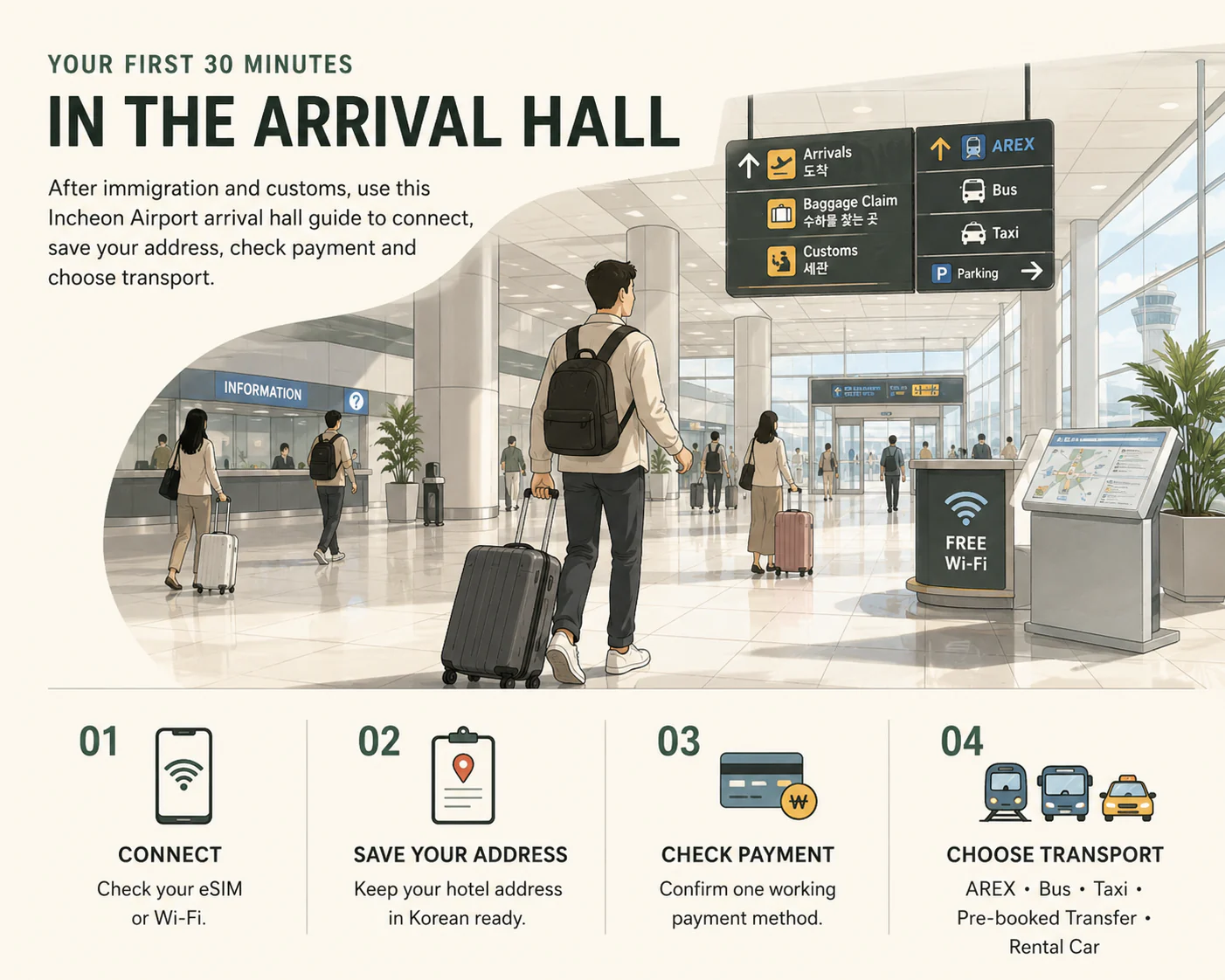
Incheon Airport first steps infographic showing internet, T-money, cash, AREX, airport bus, taxi and rent-a-car pickup
Use this as your quick reference. Do these basics first, then choose AREX, airport bus, taxi or rental car.

Arrival flow

Arrival Guide: what to do after landing

Instead of reading a complicated terminal map, follow this simple action flow first. It shows what to do in order after landing.

?ˆοΈArrive

Open the landing guide.

Start guide ??/em>
??/div>
?›„Baggage Claim

Pick up checked luggage.

??/div>
?šͺCustoms Exit

Enter the arrivals hall.

??/div>
?“ΆeSIM / SIM

Connect before leaving.

??/div>
?’³T-money

Buy or load your transport card.

??/div>
?š†AREX / Bus / Taxi

Choose your way to Seoul.

Avoid mistakes

Common first-day mistakes

Don't rely only on Google Maps.
Do install Naver Map or KakaoMap before leaving the airport.
Don't leave with no internet.
Do activate eSIM or connect to airport Wi?‘Fi first.
Don't load only ??,000 to T-money.
Do load enough for your first day of rides.
Don't follow unofficial taxi offers.
Do use official signs, counters and taxi stands.

Insider knowledge

Hidden Airport Tips

Small details that can save time, stress and confusion after arriving in Korea.

Save your hotel address in Korean

Taxi drivers and local map apps work best with Korean-language addresses. English addresses may not be recognized.

What to do

Ask your hotel to send the address in Korean before you arrive. Copy it into your notes app so you can show it to drivers or paste it into Naver Map.

Korea Inside Tip

Even if your hotel booking shows an English address, the Korean version is what you actually need for taxis, delivery and local navigation.

Take a photo of your baggage tag

If your luggage is delayed or lost, the baggage tag number is essential for filing a claim at the airline counter.

What to do

Before boarding, photograph the baggage tag sticker on your boarding pass or luggage receipt. Keep it accessible on your phone.

Korea Inside Tip

If your bag does not arrive, go to the baggage claim office before leaving the arrivals area. They will need your tag number and flight details.

Airport Wi?‘Fi works throughout the terminal

Free Wi?‘Fi is available throughout Terminal 1 and Terminal 2, making it easy to activate your eSIM, check maps and contact your hotel after arrival.

What to do

Connect to the airport Wi-Fi network as soon as you land. Use it to activate your eSIM, check maps or message your hotel while still inside the terminal.

Korea Inside Tip

Free Wi-Fi is helpful inside the airport, but you still need mobile data once you leave. Set up your eSIM or buy a SIM before exiting.

Convenience stores are often the easiest place to buy T-money

CU, GS25, 7-Eleven and emart24 inside the airport sell T-money cards and allow cash top-ups at the counter.

What to do

Find a convenience store after passing through arrivals. Ask for a T-money card and load at least 20,000 won for your first day of transit.

Korea Inside Tip

Some top-up machines only accept cash. Buying and loading at the convenience store counter avoids this issue entirely.

Google Maps may not work as expected in Korea

Due to local mapping restrictions, Google Maps often shows incomplete transit routes, missing walking paths and inaccurate arrival times in Korea.

What to do

Download Naver Map or KakaoMap before leaving the airport. These apps provide accurate Korean transit, walking and driving directions.

Korea Inside Tip

You can still use Google Maps to find a place name, but always switch to Naver Map or KakaoMap for actual route navigation inside Korea.

Your internet may not work immediately after landing

Your phone may not have internet immediately after landing. Screenshots of your hotel address, booking confirmation and transport instructions can save you.

What to do

Before the plane lands, screenshot your hotel confirmation, Korean address, transport plan and any QR codes you might need.

Korea Inside Tip

Even with eSIM, activation can take a few minutes. Having offline screenshots means you are never stuck without critical information.

Airport Problems

Airport Problems & Solutions

Common airport problems and what to do before leaving the terminal.

My luggage did not arrive

Problem: Your checked bag is not on the carousel after all other bags have been collected.

What to do now: Go to the baggage claim office (located near the carousels) before leaving the arrivals area. Show your baggage tag and boarding pass. They will file a report and arrange delivery to your hotel.

Backup option: Ask the airline counter about emergency kits or compensation for delayed bags. Keep receipts for any essential items you purchase.

Immigration line is too long

Problem: The immigration queue is extremely long and you are worried about missing a connection or transport.

What to do now: Stay in line. There is no shortcut for standard immigration. Use the waiting time to connect to airport Wi-Fi, activate your eSIM or review your transport plan.

Backup option: If you have a connecting domestic flight, inform an airport staff member. They may guide you to a priority lane in urgent cases.

My foreign card was declined

Problem: Your credit or debit card does not work at an airport store, kiosk or machine.

What to do now: Try a different terminal or machine. Some kiosks and vending machines do not accept foreign cards even if the store itself does. If possible, try a staffed counter instead.

Backup option: Withdraw cash from a Global ATM (look for Hana Bank or Woori Bank ATMs in the arrivals area). Always prepare a backup payment method such as another card, cash or a prepaid travel card.

I cannot find the AREX station

Problem: You exited arrivals but cannot locate the Airport Railroad (AREX) entrance.

What to do now: Follow the blue "Airport Railroad" or "AREX" signs. In Terminal 1, the station is on basement level 1 (B1). In Terminal 2, follow signs toward the underground transportation center.

Backup option: Ask any information desk staff. They can point you to the nearest elevator or escalator leading to the AREX platform.

Which terminal am I in?

Problem: You are unsure whether you landed at Terminal 1 or Terminal 2.

What to do now: Check your boarding pass or airline app. Most airlines use Terminal 1. Korean Air, Delta, KLM, Air France and some others use Terminal 2.

Backup option: Look at the terminal signs around you or ask any airport staff member. A free shuttle train connects Terminal 1 and Terminal 2 if you are in the wrong one.

I arrived late at night

Problem: You landed after midnight and AREX or airport buses have stopped running.

What to do now: Use the official taxi stand on the arrivals level. Late-night taxis to Seoul cost more but are always available. Show your hotel address in Korean to the driver.

Backup option: Some budget travelers stay at an airport capsule hotel or rest area until the first AREX train (around 5:20 AM). Check availability at the information desk.

Foreign card acceptance at the airport and in Korea

Card Network Acceptance Level
VisaExcellent
MastercardExcellent
American ExpressVery good
JCBLimited
UnionPayLimited

A card can still fail if international transactions are disabled on your account. Many payment problems are caused by card settings, kiosks or payment terminals, not only by Korea itself.

Always prepare a backup payment method such as another card, cash or a prepaid travel card (for example, WOWPASS or similar prepaid options available in Korea).

FAQ

10 real airport questions foreigners ask

Short answers for your first hour in Korea.

1. Do I need an eSIM before arriving in Korea?

It is strongly recommended. If your phone supports eSIM, set it up before landing so you can use maps, messages and taxi apps immediately.

2. Can I buy a T-money card at the airport?

Yes. You can usually buy one at convenience stores such as CU, GS25, 7?‘Eleven or emart24. Keep cash available because some top-ups may require cash.

3. Should I exchange cash at Incheon Airport?

Exchange only a small amount if needed. Korea is card-friendly, but backup cash is useful for T-money top-up, small shops or emergencies.

4. Is Google Maps reliable in Korea?

Not fully. Google Maps can be incomplete for walking and transit routes. Use Naver Map or KakaoMap for local navigation.

5. What is the fastest way to get to Seoul?

AREX Express is usually the fastest and most predictable option if you are going to Seoul Station. For hotels far from Seoul Station, airport bus may be easier.

6. Can I use my Visa or Mastercard in Korea?

Usually yes, but not everywhere. Some small stores, machines or local services may reject foreign cards. Keep a backup payment method.

7. Is free Wi?‘Fi available at Incheon Airport?

Yes. Free airport Wi?‘Fi is available in the terminal, but you should still prepare mobile data before leaving the airport.

8. Do taxi drivers speak English?

Some do, but many do not. Show your destination in Korean on your phone and use the official taxi stand.

9. Should I rent a car at Incheon Airport?

Usually not for Seoul-only trips. It can be useful for Jeju, road trips, multiple cities or long stays outside Seoul.

10. What should I do first after leaving the arrival gate?

Get internet, buy or load T-money, prepare backup cash, open Naver Map or KakaoMap, then choose AREX, bus, taxi or rental car pickup.